


Version 1.3.1, out September 24

Stop Auditioning.
Start Blending.

Grit Blender is a saturation plugin with twelve characters, from tape and tube to fuzz. Put three on a triangle, drag one dot between them, and hear the blend change as you move.

$58 + tax if applicable

Free unlimited trial · One-time purchase, free updates · 30-day money-back guarantee · Offline licence

CLAP · VST3 · AU · AAX  |  macOS · Windows · Linux

“Grit Blender is hugely impressive… the processing ranges from subtle to extreme, in all sorts of wonderful ways.”

Watch Grit Blender presentation video

Featured on

Sound on Sound KVR Audio Audiofanzine Rekkerd Gearspace Audio Plugin Guy Monthly Mixing Bedroom Producers Blog MixbusTv Production Expert

You know the moment the saturation is right.

The drum bus stops sounding like a recording of drums and starts sounding like a record. The bass grows a little teeth and finally sits. You stop reaching for the mouse and you lean in.

That moment rarely lives inside one saturator. It’s tape with a touch of tube, or tube with a hint of fuzz. Grit Blender is built for the in-between: three saturations on a triangle, one dot, and every position on the way is a sound you can hear.

You don’t stack plugins and fix the gain between them. You drag, you listen, you stop when you grin. Joy to use, joy to hear.

Grit Blender blend panel: three saturation types on a triangle, chosen among twelve

Three saturations. One dot. Everything in between.

Each corner of the triangle holds one of twelve saturation types: tape, tube, transistor, digital, diode, fuzz, desk, ribbon, pentode, rectifier, wavefolder and asymmetric. Pick the three you want from the menu at each corner, or hit RANDOM and let it choose. Then drag the dot. Near a corner you hear that type. In the middle you hear all three at once.

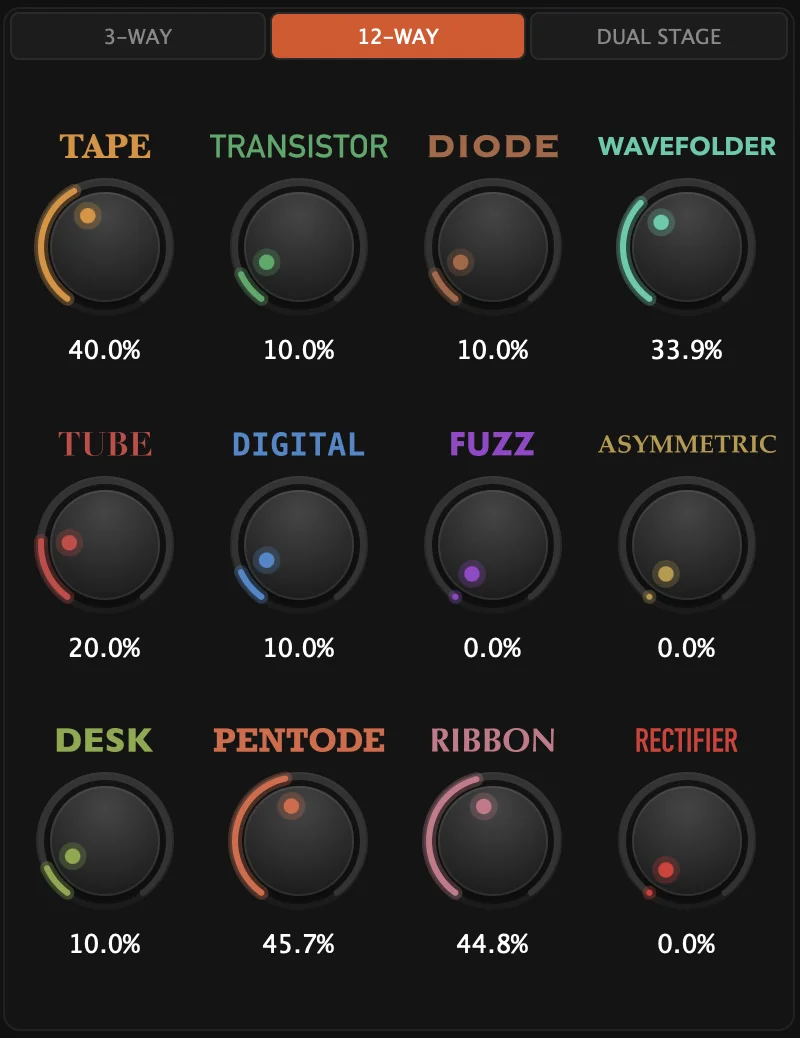
Want all twelve? 12-Way mode gives each type its own slider. Want more? Dual Stage puts two triangles in series, the first feeding the second, with a filter between them that keeps the result in check.

The triangle isn’t decoration, it is the sound. It feels less like picking a plugin and more like mixing colours.

  • 12 saturation types, three at a time on the triangle
  • RANDOM, for a fresh blend in any mode
  • 12-Way mode: one slider per type
  • Dual Stage: two triangles in series, filtered between stages
  • A transfer curve and a harmonics display that show what each move does

From a preset to a sound that sits, in a minute

1

Load a preset

39 factory presets in seven categories, from Warm Tape to Drum Punch, Bass Thickener and Master Glue.

2

Drag the dot

Toward the character you hear in your head. Swap a corner from its menu, or hit RANDOM and see where it takes you.

3

Make it sit

In the ADV panel, PUNCH keeps the attack and SMOOTH takes the bite off the top. Turn on LOUDNESS MATCH to hear whether it is better or only louder. Set MIX and move on.

Hear the difference

Flip between dry and wet, and hear what the blend adds. Best with headphones.

Tape Saturation on Drums

Tape on the drum bus: warmth and glue, and the hits still land.

Tube Drive on Bass Guitar

Tube on a DI bass, from clean presence to a controlled growl.

Wavefold on Synth Pad

The wavefolder on a synth pad, blended with the clean signal for a texture that keeps moving.

Saturate the bass. Keep the note.

Send the MIDI of your bass line to Grit Blender and turn on KEY TRACK. The low split follows the notes you play, half an octave above each one, so the fundamental reaches the saturator 14 dB down and stays clean while the harmonics above it get the grit. Play low or high, the split moves with you.

Turn on RESONANCE and the played note gets a peak before the saturation, up to 12 dB, so the line comes through the dirt.

You stop riding a crossover and start playing the bass.

“the key track feature is a genuinely smart idea […] way more musical on bass especially, because the crossover tracks the note instead of fighting it.”

K
kernaudioio KVR Audio forum

The details that make it sit

The low end stays put

By default, everything below 80 Hz skips the saturation. Turn on LOW CROSSOVER in the ADV panel to set the split by hand, anywhere from 40 Hz up, or let KEY TRACK move it with the notes. Push the drive on an 808 or a full mix and the bottom stays tight. You can go hard without paying for it in the low end.

Keep the attack, lose the harshness

PUNCH brings back the transients that saturation softens. SMOOTH listens for the harsh frequencies the saturation creates and turns down only those. Scale each one from 0 to 200 %. Your drums still hit, and your vocal stays easy to listen to, even pushed.

Tone after the grit

TONE is an EQ on the saturated signal, and its curve changes what the knob does. Warm adds body to a bass, Presence pulls a vocal forward, Air puts sparkle on a drum bus, Smile lifts both ends. One knob, aimed where the track needs it.

Mid and side, left and right

Switch on M/S and the side channel gets its own drive (S DRIVE), its own mix and its own crossover points. Saturate the centre gently and push the sides a little harder. The width comes from the character you add.

See what each move does

The transfer curve shows how your signal is being shaped. The harmonics display below it shows which frequencies gain and which lose, with the level difference taken out, so you see the colour and not the volume. Your ears decide, your eyes confirm.

Judge the colour, not the volume

Turn on LOUDNESS MATCH and the output stays close to your input level, so the saturation never wins your A/B just by being louder. BYPASS crossfades in 5 ms, without a click. You compare honestly, then you commit.

In their words.

“I think that your GRIT BLENDER beats them all.”

MM
Mladen Milicevic Composer of the score for The Room, Professor Emeritus of Recording Arts at Loyola Marymount University

“Grit Blender is a product that relies not on flashy graphics, marketing buzzwords like ‘Real Analog,’ or brand power — but purely on functionality and ideas.”

Monthly Mixing
Chanwool Park Monthly Mixing

“OOOHH WOOOW. My immediate go to distortion :-) And I own about 1000 plugins. Love the GUI, love the possibilities, love the sound.”

SF
Sid Francis Producer

“Grit Blender has been making more and more of an introduction in my sessions recently. It's comparable to Decapitator, definitely comparable.”

OS
Oliver Shillito Producer / Engineer

“I stumbled upon a hidden gem. Grit Blender is a very unique and very versatile saturator plug-in.”

DG
David Gnozzi MixbusTv

“It is being saved in my default Bitwig chains. This is one of the best plugins I have come across in a long time, keep up the great work.”

PJ
Pete J Producer

“Grit Blender is absolutely great. Very well executed, very good sounding, very user friendly.”

P
Pawel Folia Soundstudio

“Franchement c'est super ! Très belle qualité et grande polyvalence, notamment pour les drones et synthés ou je trouve parfois ces types d'effets assez limités. Et bravo pour le système d'activation, c'est vraiment un plus de faire confiance aux utilisateurs sans leur imposer des activations invasives.”

D
Damien Audiofanzine

“J'ai adoré le plugin. (…) Une boîte à couleurs pour toutes les saturations.”

A
André Académie du Gros Son

“It is very convenient to have these colours all in one place, and don't need to do the guesswork about what's better. Your Grit Blender will definitely be on the go-tos for now, and it is just quick to adjust!”

ML
Mingze Li Producer and FOH Sound Engineer

See it in action

David Gnozzi (MixbusTv) review of Grit Blender

David Gnozzi, MixbusTv

Audio Linea review of Grit Blender

Audio Linea

The Sound Test Room review of Grit Blender

The Sound Test Room

MeinHomestudio review of Grit Blender

Paul Marx, MeinHomestudio

wil maker review of Grit Blender

wil maker

Folia Soundstudio review of Grit Blender

Folia Soundstudio

Elektronick Musick review of Grit Blender

Elektronick Musick

Oliver Shillito review of Grit Blender

Oliver Shillito

Académie du Gros Son review of Grit Blender

Académie du Gros Son

Ben, founder of UB DSP

One person builds this.

I’m Ben. I write every UB DSP plugin myself: the DSP, the interface, the manual, and the replies to your emails. Master’s in Signal Processing, Bitwig Certified Trainer, and I make music as unTIL BEN and with Scarset Rebellion.

Grit Blender was the first Blender. Learn it and you know the other two: Vowel Blender and Filter Blender work the same way, one dot and a sound you can hear move.

Joy to use, joy to hear. That is the only brief I give myself.

Hear the music →   Read the manual →

Fair questions, straight answers.

Before you buy

“I already own Decapitator.”

Keep it. Soundtoys describes Decapitator as an analog saturation modeler: five models to choose from, a tone control, a mix control and the Punish button. Grit Blender starts from a different idea. You put three of its twelve types on a triangle and move one dot between them, mix all twelve on sliders in 12-Way, or chain two blends in Dual Stage, so the sound you want can sit between characters. The trial has no time limit: put both on the same track and keep the one you reach for.

“I already own too many plugins.”

Fair. Grit Blender isn’t one more character to audition. It’s where tape, tube, fuzz and nine others meet: three at a time under one dot, all twelve at once in 12-Way, or two blends in a row in Dual Stage. And the helpers you’d otherwise add after it (PUNCH, SMOOTH, TONE) are already inside. If it doesn’t earn a slot in your default chain, the 30-day money-back guarantee covers you.

“Trying not to buy more plugins. […] Was hoping I wouldn’t like this one either, but I’m really digging it. […] Definitely has a vibe and utility that my other saturation devices don’t. I bought it.”
billinder33, KVR Audio forum

“A triangle on a saturator. Isn’t that a gimmick?”

It’s the main control, not a picture. Every position of the dot is a different mix of three saturation curves, and the transfer curve above it shows the shape you’ve made. The blend is stored in the plugin’s parameters, one level per saturation type, so your DAW can automate it and the dot follows the automation: the character can change with the song.

“One developer I’ve never heard of. Will this still work in five years?”

A fair question, and I won’t answer it with a promise. Here is what you can check. Grit Blender came out in February 2026. It is one of three Blenders, and Sound on Sound reviewed it and Vowel Blender. Updates are free for life. Your licence is a file on your computer, checked offline: nothing at UB DSP needs to be online for the plugin to keep working. And when you write to support, I’m the one who answers.

The practical side

AU, VST3, CLAP and AAX on macOS (Apple Silicon and Intel, macOS 10.13 or later; versions before macOS 11 are not tested). VST3, CLAP and AAX on Windows. VST3 and CLAP on Linux. There is no standalone app. It has been tested in Logic Pro, Ableton Live, Bitwig Studio, REAPER, FL Studio, Cubase and Pro Tools. It runs on mono and stereo tracks, and Pro Tools lists a mono and a stereo version. In Logic Pro, look under MIDI-controlled Effects: Grit Blender accepts MIDI for KEY TRACK, so that is where Logic files it. If something does not work in your setup, the 30-day money-back guarantee covers you.

No. Only KEY TRACK and RESONANCE follow MIDI notes: route the MIDI of your bass or synth part to Grit Blender, and leave LOW CROSSOVER off, since it takes over from KEY TRACK. Everything else works on audio alone, with the low split at 80 Hz.

It depends on the oversampling, the biggest factor: 2x, 4x (the default) or 8x, cleaner at each step, with more CPU and more latency. Grit Blender reports its latency to your DAW, so it compensates.

39 factory presets in seven categories (Basics, Character, Blend, Special, Psychoacoustic, Mid/Side and Dual Stage), from subtle bus glue to Dual Stage destruction. Plus your own presets, A/B comparison, and undo and redo.

You buy once, you get a keyfile, you load it in the plugin. The check happens on your computer, with no activation server and no dongle. Your licence covers up to three computers you personally own and use, and the keyfile stays in your account at ubdsp.com if you need it again. Until you buy, the trial is the full plugin with 2 seconds of silence every 40 seconds, for as long as you like. Updates are free for life. Telemetry is off unless you turn it on.

One payment, no subscription, free updates for life. Every purchase has a 30-day money-back guarantee, no questions asked, and the trial has no time limit, so you can decide on your own tracks before paying. If you already own Vowel Blender or Filter Blender, log in: your owner’s price shows on this page.

Technical details

Plugin formats macOS: AU, VST3, CLAP, AAX · Windows: VST3, CLAP, AAX · Linux: VST3, CLAP
Platforms macOS 10.13 or later (Apple Silicon and Intel; versions before macOS 11 are not tested), Windows 64-bit, Linux 64-bit
Saturation types 12: tape, tube, transistor, digital, diode, fuzz, desk, ribbon, pentode, rectifier, wavefolder, asymmetric
Blend modes 3-Way (three types, one dot), 12-Way (one slider per type), Dual Stage (two triangles in series, filtered between stages). RANDOM in every mode.
Low split Always on, 80 Hz by default, 24 dB/oct. LOW CROSSOVER and HIGH CROSSOVER from 40 Hz to 16 kHz.
MIDI KEY TRACK (the low split follows the played note, half an octave above it), RESONANCE (a peak at the played note, up to +12 dB)
Character PUNCH, SMOOTH, ANALOG, each from 0 to 200 %
Tone EQ on the saturated signal, 5 curves: Default, Warm, Presence, Air, Smile
Stereo Off, M/S or L/R. The second channel has its own drive, mix and crossover points. Mono and stereo tracks.
Controls DRIVE, DRIVE 2 (Dual Stage), TONE, MIX, INPUT GAIN and LEVEL (±12 dB), LOUDNESS MATCH, BYPASS (5 ms crossfade)
Oversampling 2x, 4x (default), 8x. The latency depends on the setting and is reported to your DAW.
Displays Transfer curve, level-normalised harmonics display, input and output meters you can drag to trim
Presets 39 factory presets in 7 categories, user presets, A/B
Window Resizable, undo and redo, help mode
Licence Offline keyfile, up to 3 computers you own. Free unlimited trial: fully working, with 2 seconds of silence every 40 seconds.

Stop auditioning. Start playing.

Load a preset, drag the dot, and stop when you grin. One-time purchase, free updates for life.

$58

One-time purchase · Free updates · 30-day money-back guarantee

+ tax if applicable

Get Grit Blender for $58.

Try it free

Already running the trial? Load your keyfile and the silences stop. Nothing to reinstall.

Already own Vowel Blender or Filter Blender? Log in and your owner’s price shows here.