
You put a saturator across the drum bus. The kick gets weight, the snare gets edge, and then you listen to the overheads and the sticks are gone. Not darker. Blunter. The cymbal wash is still there, louder if anything, but the moment where the stick hits the metal has lost its point.
Bypass, and the sticks come back. So you try the usual things. Less drive. A slower attack, except there is no attack control. An aux send instead of an insert. Some of it helps a little. None of it explains anything.
Here is what is actually happening, and it is not what the word "saturation" suggests.
A saturation curve has no attack time
A waveshaper is memoryless. Each output sample depends on the value of the input sample at that instant, and on nothing else. No detector, no envelope, no time constants. Feed it 0.3 and you always get the same answer. Feed it 0.9 and you always get the same answer.
That sounds like it should be gentle, because nothing is reacting to anything. It is the opposite. A compressor needs a few milliseconds to decide that a hit has arrived, which is why fast transients slip past it. A curve needs zero milliseconds. It is already in the right place on the graph before the peak has finished rising.
So the gain it applies changes within a single cycle of a waveform, and there is no setting anywhere that slows it down.
The gain changes at every sample
Take a plain soft clipper: tanh of twice the input, scaled so that a full scale sample comes out at full scale. Nothing exotic. Here is the gain it applies, sample by sample, depending on how loud that sample is.
| Input sample level | Output level | Gain applied |
|---|---|---|
| -30 dBFS | -23.7 dBFS | +6.3 dB |
| -18 dBFS | -11.8 dBFS | +6.2 dB |
| -12 dBFS | -6.4 dBFS | +5.6 dB |
| -6 dBFS | -2.0 dBFS | +4.0 dB |
| -3 dBFS | -0.7 dBFS | +2.3 dB |
| 0 dBFS | 0.0 dBFS | 0.0 dB |
Quiet samples get more than 6 dB of gain. The loudest samples get none. That gap is the whole mechanism, and you can read the consequence straight off the table: a drum hit whose peak sits at 0 dBFS and whose body sits at -12 dBFS walks in with 12 dB of crest factor and walks out with 6.4 dB. More than 5 dB of punch, gone, with no knob involved.
Most explanations stop there, and it still does not explain your overheads.
The number that matters is the gain on everything else
Your overheads are not the loudest thing on that bus. The close mics are. So the overheads never reach the flat part of the curve on their own.
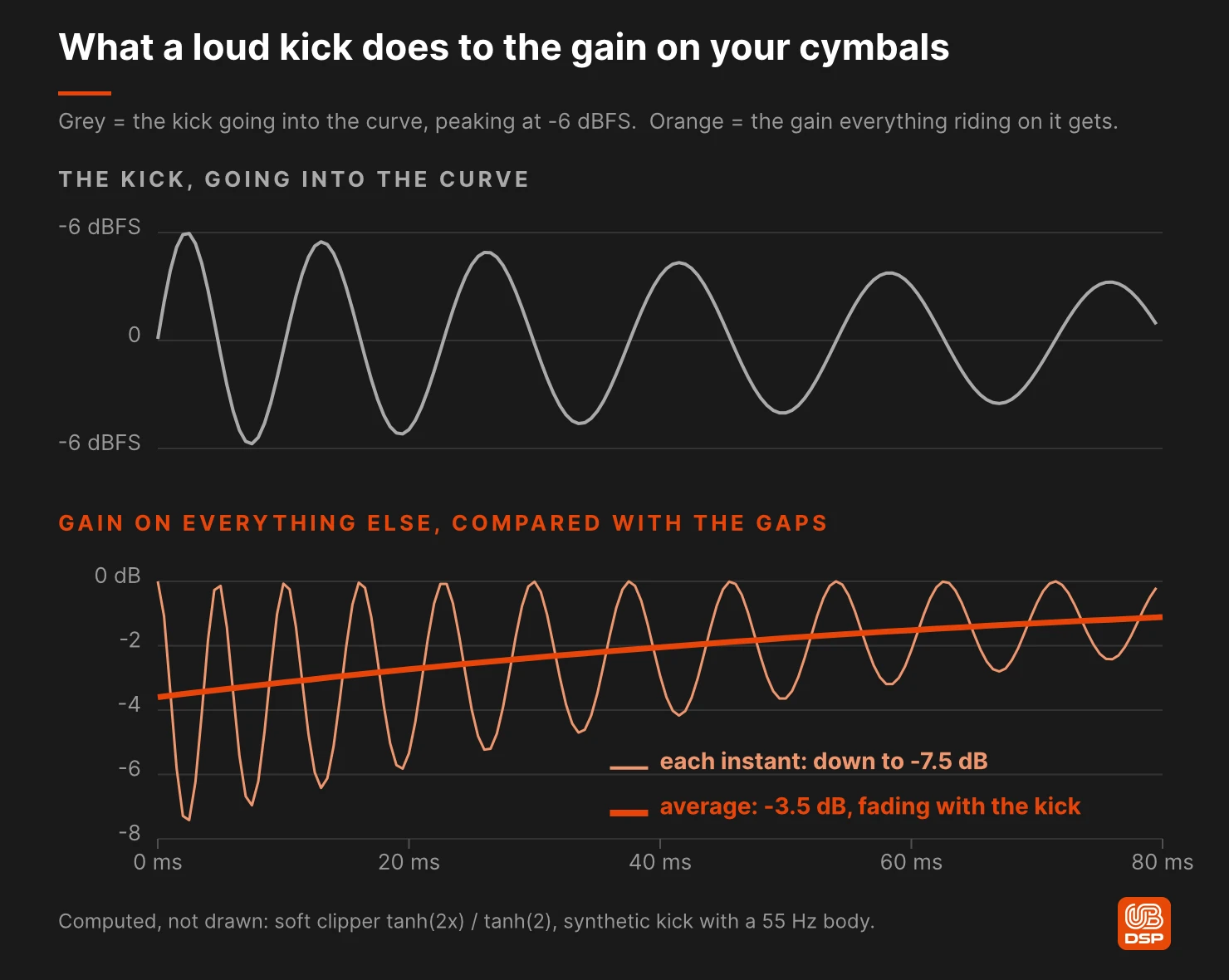
But the curve does not see "the overheads". It sees one number, the sum of everything, at each sample. When the kick's waveform is sitting high on the curve, whatever rides on top of it at that instant gets the slope of the curve at that point, not the gain from the table above. And near the top, the slope is small.
Same soft clipper. Here is how much less gain a quiet signal gets while a loud one sits underneath it, compared with what it gets in the gaps. The first column is the instant the kick's waveform peaks. The second is the same thing averaged over a whole kick cycle, which is closer to what you hear.
| Where the kick peaks | At that instant | Averaged over a kick cycle |
|---|---|---|
| -18 dBFS | -0.5 dB | -0.3 dB |
| -12 dBFS | -2.1 dB | -1.0 dB |
| -9 dBFS | -4.0 dB | -1.9 dB |
| -6 dBFS | -7.6 dB | -3.5 dB |
| -3 dBFS | -13.5 dB | -5.9 dB |
| 0 dBFS | -23.0 dB | -9.0 dB |
Read the right-hand column. With the kick peaking at -6 dBFS going into the curve, everything riding on it is turned down by about 3.5 dB for as long as the kick rings. At -3 dBFS, about 6 dB. Push the kick to full scale and it is 9 dB.
A saturator on a bus is a ducker, and the loudest element is holding the key.
Audio engineers have measured this since the 1930s. The standard intermodulation test, SMPTE RP 120, feeds a device a loud 60 Hz tone and a 7 kHz tone 12 dB quieter, filters the low tone back out, and measures how much the high tone has been amplitude modulated by it. A kick under a cymbal is that test, played on a drum kit. Radio engineers have a name for the same thing, cross modulation: the strong signal's envelope gets printed onto the weak one.
It just rarely gets described this way in a mixing context. The pedal word is "compression", the plugin word is "warmth", and the thing on the screen is a curve with no controls that look like a sidechain. But the arithmetic says the kick is turning your cymbals down, twice per kick cycle, at waveform rate, and on average by a few dB for as long as it rings.
Why the wash survives and the sticks do not
Now put the two tables together, because this is the bit that matches what you hear.
A cymbal is an attack followed by a long, quiet decay. The decay sits low on the curve, so it collects the full +6 dB, in every gap between kicks. The attack sits higher, so it gets less, and it gets ducked on top of that if it lands while the kick is ringing, which on a real take it constantly does.
I simulated it to put a size on it: a synthetic kick (a 55 Hz body falling from 110 Hz and dying away over about a tenth of a second, plus a short click), and stick hits a millisecond and a half long, through the same curve. Stick hits that landed in the first 40 ms of the kick came out 3 dB lower than the same hits in the gaps with the kick peaking at -6 dBFS, 4.4 dB lower at -3 dBFS, and 9 dB lower at full scale.
The wash comes up and the stick goes down. Nothing removed the transient. Everything around it got louder, and the kick keeps pushing it down.
That is also why listening to the overheads on their own tells you so little. Without the kick there is nothing to duck them, so the ducking disappears and you are left wondering why they sounded fine by themselves.
This is the same thing I wrote about in September, seen from the other side
In Why Saturating a Drum Bus Muddies the Low End and Hardens the Cymbals I took this apart in the frequency domain: a non-linearity applied to a sum produces sum and difference products between the kick's fundamental and the broadband content of the cymbals, which is where the harshness up top comes from.
Amplitude modulation at the kick's rate and sidebands spaced by the kick's frequency are the same physical event, described twice. In time you hear ducking, in the spectrum you see sidebands, and in both cases the cause is the level of the loudest element going into the curve.
If you want the spectral version, with the numbers on where the new frequencies land, that article has it. This one is about what it does to the shape of the hit.
Does an aux send fix it?
Partly. It turns the problem into a control, which is still worth a lot.
With the saturator on an insert, you get whatever crest factor the curve leaves you. On a send, the dry path keeps the original peak intact and you add the crushed version on top. A MIX knob crossfades between the two. Same curve, same hit, peak at 0 dBFS and body at -12 dBFS:
| How the saturator is wired | Crest factor out |
|---|---|
| Dry only | 12.0 dB |
| Send, return 6 dB down | 9.7 dB |
| Send, return at unity | 8.7 dB |
| MIX at 50 % | 8.7 dB |
| MIX at 75 % | 7.5 dB |
| Insert, or MIX at 100 % | 6.4 dB |
So neither restores the transient. A send gives you a dial between the dry 12 dB and 8.7 dB with the return at unity, and a MIX knob covers the whole range down to the insert's 6.4 dB. Either way you stop where the hit still has a point.
Two conditions, though. The two paths have to be sample aligned, or you are mixing a delayed copy of the dry signal with itself and the comb filtering will cost you more than the saturation gave you. And the harmonics on the wet path are new content that was never in the dry signal, so no amount of phase alignment will cancel them. That is what you came for anyway.
Four things that reduce it
Feed it less, from the top. The crest factor loss depends on where the peak lands on the curve, not on how much gain the plugin adds afterwards. Back the input off by 6 dB and that same hit loses 2.2 dB of crest factor instead of 5.6 dB. Same curve, same drive setting, more than half the damage gone. This is the single biggest lever and it costs nothing.
Turn the kick down before the curve, not after. Since the ducking is driven by whatever sits highest on the curve, and on a drum bus that is almost always the kick, pulling the kick down going in buys your overheads back directly. In the simulation above, a kick peaking at -6 dBFS instead of -3 dBFS took the dip on the sticks from 4.4 dB to 3 dB. Push it back up afterwards if you want it. Same move as in the September article, same reason.
Split the bus and accept that you are making two decisions. Kick and snare one way, overheads the other. It works because once the cymbals stop sharing a curve with the kick, nothing loud is left to duck them.
Use less of it, in parallel, and judge at matched peaks. A curve that lowers crest factor makes everything sound louder and more present, which is exactly the conditions under which people decide a plugin is good. Match peak levels before you compare, or you will keep choosing the setting that did the most damage.
A test that takes thirty seconds
Mute everything on the drum bus except the overheads, with the saturator still in, and set a level you like. Now unmute the kick only, and listen to the cymbals, not the kick.
If the cymbals sink a little each time the kick hits, you have found it. Expect a few dB, not a dropout. Nothing in the chain is reacting. The curve hands out gain sample by sample, and the kick decides how much.
Then do the same thing with the kick turned down 6 dB going into the plugin. The dip gets smaller and your decision gets easier, and you will hear how much of your overhead sound was a level choice disguised as a tone choice.
Where this leaves Grit Blender
Three things in Grit Blender matter here, and one of them is a limit rather than a feature.
By default, the lows below 80 Hz bypass the curve. Grit Blender splits the signal with a 24 dB/oct Linkwitz-Riley crossover, sends the band below 80 Hz around the saturation and recombines it phase aligned. On a drum bus that keeps most of the kick's fundamental out of the signal that drives the ducking. Not all of it, because a crossover has a slope, and not the click, which is broadband and sits well above it. In the same simulation, an 80 Hz split in front of the curve took the dip on the stick hits from 3 dB to about half a dB with the kick at -6 dBFS, and from 9 dB to 2.4 dB with the kick at full scale. That simulation uses the textbook curve, not Grit Blender's twelve, so take the sizes as an indication and the direction as solid. To move the split higher, turn on LOW CROSSOVER in the Advanced panel.
Highs hit the curve at a lower level than lows. Before the curve, Grit Blender turns everything above 3 kHz down by about 4 dB with a shelf, and after the curve it puts it back with the exact inverse. Cymbals therefore arrive further down the curve than the kick does, so their own attacks lose less of their crest factor for the same drive setting. That is deliberate. It keeps the curve from piling harsh harmonics onto the top end. It does nothing about the kick's ducking, which depends on where the kick sits, not the cymbals.
Two of the twelve types do have a time constant. Tube and Pentode share a dynamic sag with a 25 ms attack and an 80 ms release, worth up to 15 % of gain reduction, weighted by how much of each is in your blend. So if you want something that breathes with the playing rather than acting instantly, those two are where it lives, and the rest of the twelve are pure curves. Worth knowing before you spend an afternoon looking for an attack knob that is not there.
And the DRIVE knob is not linear: it follows the fourth power of its position, so at 50 % you have only a sixteenth of the gain it can add. 50 % is also where it starts, and each of the twelve types is tuned so its sweet spot sits around there.
If you want the harmonic side of the story rather than the dynamic side, the companion piece is Even and Odd Harmonics Are Not Warm and Harsh, They Are Intervals.
Start with the kick's level
Every time the kick rings, your overheads get turned down by a few dB, by a curve that has no idea they are there. So the fix starts with a level decision, and level decisions are free.
Turn the kick down going into the curve, or keep its low end out of it, and listen to the sticks on the next playback.
Frequently asked questions
Does saturation kill transients?
It reduces crest factor, which is heard as a blunter transient. A soft clipper handed a hit with 12 dB of crest factor can hand back 6.4 dB. The transient is still there, everything around it is just closer to it in level.
Why do my overheads lose definition when I saturate the drum bus?
Because the curve applies one gain to the sum of everything at each instant. While the kick's waveform sits high on the curve, everything riding on it gets less gain: averaged over a kick cycle, about 3.5 dB less with the kick peaking at -6 dBFS and about 6 dB less at -3 dBFS, compared with the gaps. The cymbal decay collects the full gain in the gaps and the stick attack does not, so the wash rises and the stick definition falls.
Is this a known effect?
Yes. It is what the standard SMPTE intermodulation test measures: a loud low tone amplitude modulating a quieter high one through a non-linear device. Radio engineers call it cross modulation. On a drum bus, the loud low tone is the kick and the quieter high one is the cymbals.
Is it better to put saturation on an insert or an aux send?
Neither restores the transient. For a hit that starts with 12 dB of crest factor, a full insert leaves 6.4 dB, a send with the return at unity leaves 8.7 dB, and a MIX knob covers everything in between. The two paths have to be sample aligned, and the added harmonics cannot be cancelled by phase alignment because they were never in the dry signal.
Does a saturator work like a compressor?
It reduces dynamic range like one, and it has no detector and no time constants, so nothing about it can be slowed down or sped up. A compressor decides over milliseconds. A curve has already decided within the sample.
Will a slower attack setting fix it?
There is no attack setting on a waveshaping curve, and that is not an omission. The one exception in Grit Blender is the dynamic sag shared by the Tube and Pentode types, 25 ms attack and 80 ms release, which is a genuine envelope behaviour sitting on top of the curve.
Does oversampling help with this?
No. Oversampling addresses aliasing, which is a different mechanism, as the FAQ of the drum bus article already covers. Crest factor loss and gain modulation happen at any sample rate.
How much level should I feed a saturator?
Less than you think, and judge it by where the peaks land rather than by the drive knob. Dropping the input by 6 dB took the crest factor loss in this article's example from 5.6 dB to 2.2 dB, with every plugin setting untouched.
Does this happen on a single drum too?
Yes, but only as crest factor loss, which is often what you wanted. The ducking needs two elements of different levels sharing one curve, which is why it is a bus problem and not a channel problem.
Sources
- SMPTE, RP 120-2005, "Measurement of Intermodulation Distortion in Analog Audio Systems", reaffirmed 2010: the 60 Hz and 7 kHz test signal, 12 dB apart, and the measurement of the modulation of the high tone.
- W. Marshall Leach, Georgia Institute of Technology, "Intermodulation Distortion", course notes: how the analyzer detects the amplitude modulation of the 7 kHz term caused by the 60 Hz term.
- Electronics Notes, "Cross Modulation in Radio Receivers", for the same effect in radio terms.
- Previous articles in this series: Why Saturating a Drum Bus Muddies the Low End and Hardens the Cymbals, the frequency domain account of the same mechanism, and Even and Odd Harmonics Are Not Warm and Harsh, They Are Intervals.
- Grit Blender manual, Advanced Panel and Controls Reference sections, for the crossover and the DRIVE range.
- All gain and crest factor figures were computed on the curve tanh(2x) / tanh(2), a textbook soft clipper and not the curve of any particular plugin. The instant column is the slope of that curve at the stated level, the cycle column its average over one cycle of a sine. The stick hit figures come from a simulation through the same curve: the synthetic kick described above, stick hits as 1.5 ms bursts of high-passed noise, and each hit measured by subtracting the output of the kick alone. The Grit Blender figures (the 80 Hz crossover, the 3 kHz shelf, the 25 ms and 80 ms sag, the fourth-power drive mapping) come from its source code and its manual.
If you want a saturator that keeps the kick's low end out of the curve by default, and lets you blend three of its twelve curves on a triangle, Grit Blender has a free trial with no time limit.
Joy to use, joy to hear.
Ben, UB DSP