
You blend a saturator back in on a send, and the kick goes hollow. You check delay compensation. It's on. You try an alignment plugin, and it helps a bit, or moves the problem somewhere else.
In 2019 a producer on Gearspace described exactly this: their saturators, run on a send in parallel with a mono track, gave them "this weird phasey sound thats impossible to treat with a phase pluggin". Decapitator and Saturn, in Cubase 5, while most of their compressors behaved fine in parallel. The thread ran on and off for five years, two pages, and it is worth reading because almost every piece of the answer is in it somewhere (the thread).
One reply says the plugin "might not have a flat phase response". Another says many saturation plugins introduce phase shifts that delay compensation won't detect, and suggests an auto-alignment plugin. Someone points out that in theory a mix knob and a send are the same thing. Someone else answers that the phasing only ever shows up on a parallel bus, never with the plugin's own mix knob. And in 2025 a producer finds their saturator shifting the audio by several hundred samples, moves the duplicate by hand, and the phasing goes away.
Every one of those replies is right about something. None of them gets to the mechanism, and that's what tells you which fix to reach for.
A saturator is not only a curve
The curve is the bit that distorts. Around it, almost every saturator has filters, and you never see them:
- Oversampling filters. To keep the distortion from folding back as aliasing, the plugin runs the curve at a higher sample rate, with a low-pass filter on the way up and another on the way down.
- A DC blocker, because an asymmetrical curve pushes the waveform off centre.
- Tone shaping before and after the curve, sometimes an exact pair that cancels out in level.
- A crossover, in plugins that keep the low end out of the distortion.
These filters don't distort anything. They're linear. And at low drive, most of what comes back from your send is your own signal, just passed through them.
So the return of a parallel saturation send is mostly a filtered copy of the dry track, with the distortion on top, and you add it back to the dry track. Two versions of the same signal, one of them filtered.
Why a filtered copy digs a hole
A filter that is flat in level can still shift phase, and by a different amount at each frequency. A Linkwitz-Riley crossover, the kind used to split off the low end, is the textbook case: put the two bands back together and the level is perfectly flat, but the phase has turned by 180 degrees at the split frequency.
Add that to the dry signal and, at the split frequency, the two are opposite. They cancel.
I simulated it. The model is not any particular plugin: a fourth-order Linkwitz-Riley split at 80 Hz on the send return only, the two bands summed back, no distortion at all (the curve set to pass the signal straight through), the return at the same level as the dry track, 44.1 kHz, frequency response computed directly. Compared with a clean in-phase sum, the blend comes out:
- at 80 Hz: a full cancellation in theory (-59 dB at the nearest point of the calculation)
- at 60 Hz: -8.4 dB
- at 100 Hz: -10.3 dB
- more than 3 dB down from 41 to 155 Hz, more than 10 dB down from 63 to 101 Hz
On a kick, that's the body. On a bass, it's the note.
Why a delay can't fix it
A delay shifts the phase by an amount that grows in a straight line with frequency. A filter's phase shift doesn't follow a straight line. So you can line the two up at one frequency, or roughly over one band, but not everywhere.
I let the same simulation search for the best fix an alignment tool could offer: any delay from -200 to +200 samples in quarter-sample steps, with or without a polarity flip. The best it found, judged between 30 Hz and 1 kHz, still leaves a hole of -5.9 dB, now at 433 Hz, and the bottom of that range, at 30 Hz, falls just as far. The delay doesn't remove the hole. It moves it.
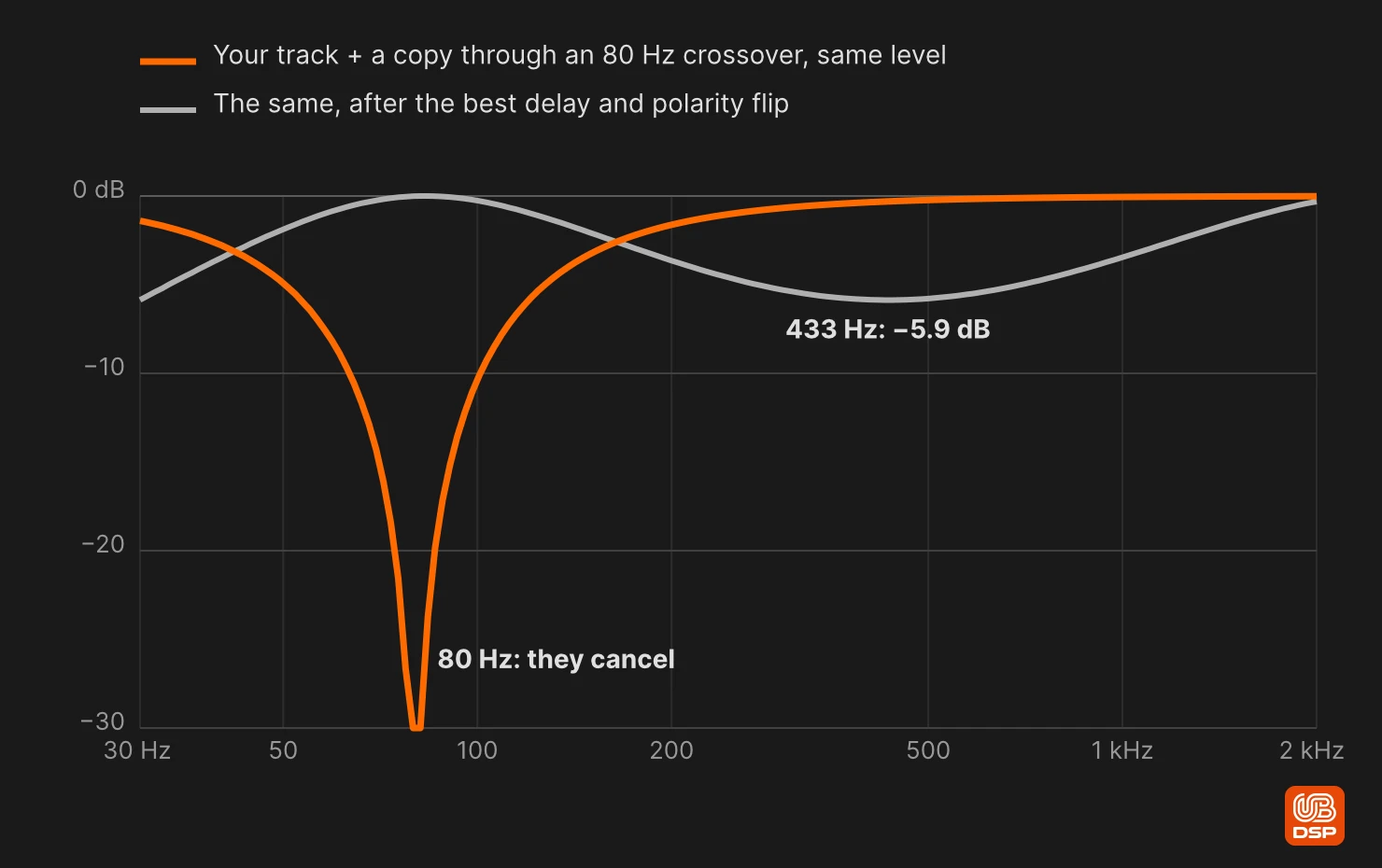
So the producer in 2019 was right that it couldn't be treated with a phase plugin. A tool built on delay and polarity is the wrong shape for a filter.
The same goes for the top end. Oversampling filters are steep low-pass filters near the top of the audio band, and their delay rises as they approach their cutoff. In a second version of the model (4x oversampling, an elliptic low-pass of order 8 with 0.1 dB ripple, 80 dB stopband and its cutoff at 19.8 kHz, used once on the way up and once on the way down, no curve, the host compensating the 3 samples of latency the filters show at 1 kHz), the blend loses more than 3 dB from about 12 to 18 kHz, and more than 40 dB at its deepest point, around 16 kHz. Real oversampling filters vary a lot from one plugin to the next, so take the shape, not the numbers.
When a delay does fix it
There's a second, simpler cause, and the 2025 post in the thread is an example of it: the delay the host makes up for isn't the delay the audio went through. Then the dry track and the return are offset by a fixed time, and a fixed time gives a regular comb. With a 3-sample offset at 44.1 kHz, the first notch lands at 7,350 Hz, and the whole top of the spectrum is affected.
That one a delay fixes completely, because it is a delay. It's also how you tell the two apart by ear and on an analyser: a comb of evenly spaced notches across the spectrum means time, and a single hole in one region (around a crossover, or near the top) means filters.
Why the mix knob doesn't do this
The difference between a mix knob and a send is inside the plugin. A well-built mix knob doesn't blend the saturated signal with your raw input. It blends it with a dry copy that went through the same crossover and the same oversampling filters, everything except the curve. Both sides have the same phase, so nothing cancels.
On a send, your dry signal never went through those filters. It can't.
That's the split in the thread. The people who hear phasing on a bus and never on the mix knob are hearing that internal dry copy do its job.
I know this one from the inside, because Grit Blender got it wrong for a while. Up to version 1.3.1, the dry signal of its MIX knob was the input, delayed, and it skipped the crossover that the saturated signal goes through. At MIX 50% with default settings, the level at 79 Hz fell to -7.4 dB, about 10 dB under an in-phase blend, measured on the plugin's own processor. Since 1.3.2, the dry copy follows the same path as the saturated signal, saturation excepted, and MIX 50% stays within 0.11 dB of an in-phase blend from 31 Hz to 14 kHz. The exception is Dual Stage, where the filters between the two stages stay on the saturated side.
What to do
Use the plugin's own mix knob when you can. In Grit Blender that's MIX (100% by default, a straight linear blend). The usual objection to the mix knob, the one raised in the thread too, is that turning it changes the level of your dry sound and wrecks your balance. In Grit, LOUDNESS MATCH sits after MIX and keeps the output close to the input level as you move it. It's a rough match averaged over a fraction of a second, not a loudness meter, but it takes the level jump out of the comparison.
On a send, think twice about plugins that keep the lows clean. If the saturator splits off the low end and passes it through untouched, a 100% wet return carries a clean, phase-rotated copy of your low end straight back into the mix. That's the 80 Hz hole above. Grit Blender does this by default: everything under 80 Hz goes around the curve through a Linkwitz-Riley split. LOW CROSSOVER moves the split (down to 40 Hz) and KEY TRACK moves it with the MIDI note you play, but neither removes it. I measured what that does on Grit's own processor, offline, with default settings: a track plus a 100% wet return at the same fader level, delay compensation on, comes out 10.4 dB under an in-phase blend around 87 Hz. Grit's MIX at 50%, same settings, stays within 0.02 dB of one. So with Grit, do your parallel saturation with MIX, not with a send. (For why you'd want the kick's low end out of the curve in the first place, see the drum bus article.)
Listen for the shape of the problem. Evenly spaced notches across the spectrum: a latency offset, fix it with a delay or a sample-accurate nudge. One hole in one region: filters, and no delay will clear it. If the plugin has a linear-phase mode, that is the setting made for this case, and one reply in the thread points to exactly that in Saturn's manual. It trades the phase shift for latency, though, and the latency then has to be compensated: the 2025 post's shift of several hundred samples appeared with Saturn's linear-phase processing on, and went away with it off.
Turn the return down. The hole is only total when the two signals are at the same level, and that's the level coming back from the plugin, not the position of the send fader: a saturator can come back louder than it went in. With the return 6 dB under the dry track, the dip at the worst frequency is about -9.5 dB. With it 12 dB under, about -4.4 dB (calculated at the frequency where the two are exactly opposite). Parallel saturation usually sits lower than the dry anyway.
Test with the drive down, but don't trust zero. The quickest diagnosis is to set the saturator as clean as it gets, flip the polarity of the return in your DAW, and listen to dry plus return: whatever doesn't cancel is the plugin's filters (or its latency). The catch: the lowest drive is rarely clean. In Grit Blender, DRIVE at 0 still shapes the signal, so this test says more about plugins whose curve really goes linear. Grit has no polarity switch, so the flip happens in your DAW.
Keep the input level in mind while you compare. Changing the send level changes where the signal sits on the curve, not only how loud the return is. That's a separate effect, covered in why input level changes the sound of a saturator.
Frequently asked questions
Is the phasey sound caused by the harmonics the saturator adds?
Not mainly. You can hear the hole at low drive, before the distortion is obvious, and it sits where the plugin's filters are: around a low-end split, or near the top of the spectrum. That points to the filtered copy of your own signal, not to the distortion.
My DAW has automatic delay compensation. Doesn't that solve it?
It solves the part that is a fixed delay, if the plugin reports its latency correctly. It can't solve a phase shift that changes with frequency, which is what filters produce.
Can an alignment plugin fix it?
Partly. It finds the best delay and polarity for the whole signal. In the simulation above, the best possible delay still left a -5.9 dB hole. It moved from 80 Hz to 433 Hz.
Is a mix knob really different from a send?
Only if the plugin's dry copy goes through the same filters as its saturated signal. When it does, the blend has no hole. On a send, your dry track can't go through the plugin's filters, so the blend can't be in phase everywhere.
Should I avoid parallel saturation on a send altogether?
No. With a plugin whose filters are gentle, a linear-phase mode, or a return well under the dry track, it can sound fine. Work out which of the two problems you have before you reach for a delay.
If you want to hear Grit Blender's MIX for yourself, the trial is on the Grit Blender page.
Sources
- Gearspace, "Phase issues with paralell saturation", December 2019 to February 2025, 33 posts.
- The Grit Blender manual, for MIX, LOUDNESS MATCH and the low split.
- Simulations in Python with SciPy, frequency responses computed directly, and measurements of Grit Blender 1.3.2's processor, run offline.
Joy to use, joy to hear.
Ben, UB DSP