
You hit play, the filter sweep starts halfway up. You stop, hit play again, and this time it starts near the bottom.
Nothing is broken. Your LFO is following a different clock than you are.
The thread that sums it up
In October, an Elektronauts user opened a thread called "The nine circles of hell of trying to control an Elektron LFO's start point". They wanted a sequence on a Tonverk to fade in, from silence on the first step to full volume on the last, with an LFO on the amp volume. Every time they hit play, the LFO began "at a random point in its curve", even after the double stop that kills the sound and resets the LFOs.
The fix came on day two, from sezare56: p-lock the first step to LFO mode TRIG and leave the track's LFO mode on FREE. Five weeks later the original poster came back: on a monophonic bassline, it seemed to work. Then the thread kept going, because with several voices the same trick stopped working, and the posters started comparing POLY and POLY M.LFO.
The thread is a pile of setting combinations. What nobody spells out is the idea behind all of them: an LFO's phase, the point it's at in its cycle, is set by exactly one clock.
Phase, in one paragraph
An LFO is a counter that goes from 0 to 1 and wraps around. The waveform is just a way of reading that counter: a sine, a ramp, a square. The phase is where the counter is right now. "My LFO starts at a random point" means "the counter was somewhere I didn't choose when the sound started".
So the useful question isn't which waveform or which rate. It's what puts the counter back to zero.
Three clocks, three behaviours
There are only three answers in practice.
1. The note. Every new note resets the counter. Each note starts its sweep from the same point. This is retrigger, or TRIG on an Elektron. Good for a wobble that belongs to the note, like a vibrato that always starts from rest.
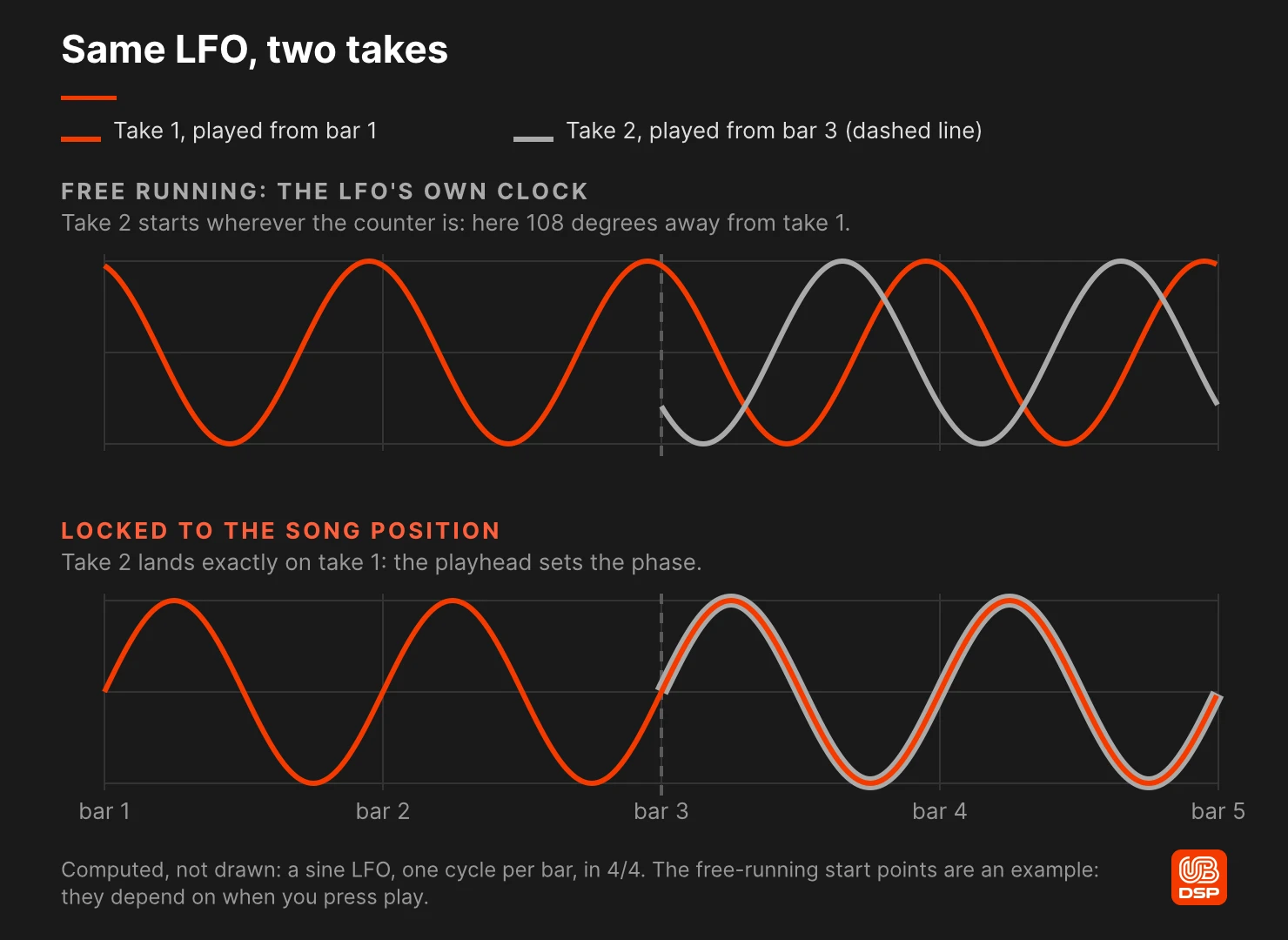
2. Nothing: the LFO's own clock. The counter started when the plugin or the track woke up, and it never stops. It keeps turning while the transport is stopped, while you think, while you scroll. When you hit play, the music starts wherever the counter happens to be. This is free running.
3. The song position. The counter isn't counting at all. It's calculated from where the playhead is: at this beat of the song, the LFO is at this point. Start playback at bar 1 or at bar 5, loop a region, the LFO is always where a playthrough from the top would have put it. That's what tempo sync means when it's done properly.
The symptom in that thread, a different start on every play, is almost always clock number 2 in disguise.
Why free running feels random
It's arithmetic you can't see. Take a free LFO at 1 Hz. You stop, and 2.3 seconds later you hit play again. The counter moved 2.3 cycles in the meantime, so the sweep restarts 108 degrees further along than where you stopped it. Wait 7.85 seconds instead and it's 306 degrees. Your timing on the play button is the random number.
That's why a rate set "in time" by ear doesn't help. Even a free LFO that runs at exactly the song tempo starts in the wrong place, because its clock started when the plugin did, not when the song did.
The polyphony trap
This is where the thread got stuck. It happens on every polyphonic synth, not just on Elektron boxes.
In a polyphonic synth, each voice usually has its own LFO. If the LFO resets on the note, every voice has its own phase, started by its own note. Play a chord, or notes on different steps, and there is no such thing as "the" phase of the LFO. There are as many as there are voices sounding.
That's exactly what the posters found. curiouspassenger: "With one voice, it works as expected. With a few voices involved, where notes are placed on different steps, it'll behave unpredictably." The p-locked TRIG on the first step only resets the voice that plays that step. The others keep their own counters. POLY M.LFO fixes it by syncing every voice's LFO to the first one, which makes it a single LFO again, for every LFO on the track.
So decide what you want before you reach for settings. A sweep across the whole pattern is one LFO for the whole instrument (mono LFO, or a modulator on the track). A wobble that belongs to each note is one LFO per voice, reset by the note. You can't have both from the same LFO.
Two smaller things that move the start
Slew. Some devices smooth the LFO's output so it can't jump. A smoothed LFO that resets has to travel from wherever it was to its new start, so the start of the cycle doesn't match the waveform. sezare56 points out this smoothing on the Tonverk's LFOs and says Elektron answered that it is by design. Look for it in your synth's manual if the very start of a cycle never sounds clean.
Phase offset counted from where? A phase knob shifts the waveform, but against which zero? On many song-locked LFOs, the zero is the start of the song (beat 0), not the start of the current bar. In 4/4, with a division that fits the bar evenly (1/1, 1/2, 1/4 and so on), every bar starts at the same point and you never notice. In another time signature you do. A 1/1 LFO (four beats long) in 3/4 starts bar 2 at 270 degrees, bar 3 at 180, bar 4 at 90, and only comes back to 0 on bar 5. If your sweep "drifts" across a waltz, that's why.
When it matters at render time
A free-running LFO also makes two bounces of the same region differ, unless something resets the plugin before each render. Whether your DAW does that depends on the DAW. A song-locked LFO doesn't have that problem for its position: the playhead decides.
To check, render the same region twice without touching anything, put the two files on two tracks, flip the polarity of one. Silence means the LFO repeated. Anything left over is the LFO doing its own thing.
Choosing the clock
- The sweep should start with the song, every time, wherever I press play: song position. In a plugin, that's usually the tempo-sync mode. Pick a division that fits your bar.
- The sweep should start with each note: retrigger. In a polyphonic synth, accept one phase per voice.
- I want it to drift and never repeat: free running. Leave it.
- It must start on the first step on a groovebox: on an Elektron box, the thread's answer is TRIG p-locked on the first step and FREE on the track, with POLY M.LFO if more than one voice sounds.
In UB DSP's effects
Filter Blender and Vowel Blender share the same modulation engine, and their LFO card makes the choice with its rate mode buttons.
- Hz is free running. The rate goes from 0.01 to 20 Hz (default 1 Hz). The LFO keeps turning with the transport stopped, and starts from zero again only when the plugin resets its modulation, for example when you load a preset or reopen the project. Pressing play doesn't reset it.
- ♩, ♩. and ♩₃ (straight, dotted, triplet) lock an LFO you add to the song position. The phase is calculated from the host's playhead, so starting at bar 5 or looping a region lands it where a playthrough from the top would. With the transport stopped, it holds still. Choose the length in DIVISION, from 8/1 (eight bars of 4/4) down to 1/64.
- Phase (0 to 360 degrees, default 0) shifts the cycle. On a synced LFO, it's counted from the start of the song, so in 4/4 a 1/1 LFO at Phase 0 starts every bar at its beginning.
There's no per-note retrigger on these LFOs: a MIDI note doesn't restart them. If you want a shape that starts on every note, use the Envelope Generator and switch its AUDIO / MIDI button to MIDI: every note-on restarts its attack. That needs MIDI sent to the effect, which this article explains for each DAW. The whole modulation system is in the Filter Blender manual.
So for a sweep that lines up with the downbeat every time: switch the LFO to ♩, set DIVISION to the length of the phrase, leave Phase at 0, hit play anywhere. The sweep is in the same place on the one, every take, and you can stop thinking about it and play.
Frequently asked questions
Why does my LFO start at a different point every time I press play?
Because it's free running: it counts its own time since it was started, and keeps counting while the transport is stopped. Switch it to a tempo-sync mode that follows the song position, or to retrigger if it should start with each note.
Is tempo sync the same as retrigger?
No. Tempo sync sets the LFO's speed from the tempo, and in a well-made plugin its position from the playhead. Retrigger resets it on each note. A synced LFO without either can still start anywhere.
Why does retrigger work on a monophonic line but not on chords?
In a polyphonic synth each voice has its own LFO, reset by its own note. With several voices sounding, there are several phases at once. Use a mono or global LFO for a sweep that spans the pattern.
My synced LFO drifts across the bars in 3/4. Is that a bug?
Probably not. Many synced LFOs count from the start of the song, not the bar. A four-beat cycle in a three-beat bar comes back to its start every four bars. Use a division that divides the bar.
Will two bounces of a free-running LFO be identical?
Not necessarily. It depends on whether the host resets the plugin before each render. Render twice, invert one, and listen to what's left.
Sources
- Elektronauts, "The nine circles of hell of trying to control an Elektron LFO's start point", October 10 to November 23, 2026, 27 posts.
- The Filter Blender manual, for the LFO card and the Envelope Generator.
- The phase figures (108 and 306 degrees, the bars in 3/4) are calculations from the formulas in this article, not measurements.
Joy to use, joy to hear.
Ben, UB DSP