
Three analog-style filters on the corners of a triangle, and one dot that moves the sound between them.
You put a filter on a loop and pull the cutoff down. The loop starts to breathe, you lean in, and for a few seconds it's the best thing in the session.
Then it's the same filter, just brighter or darker.
That lean-in is what I wanted to keep. My third plugin is built around it, and it came out on October 2, 2026.
What Filter Blender is
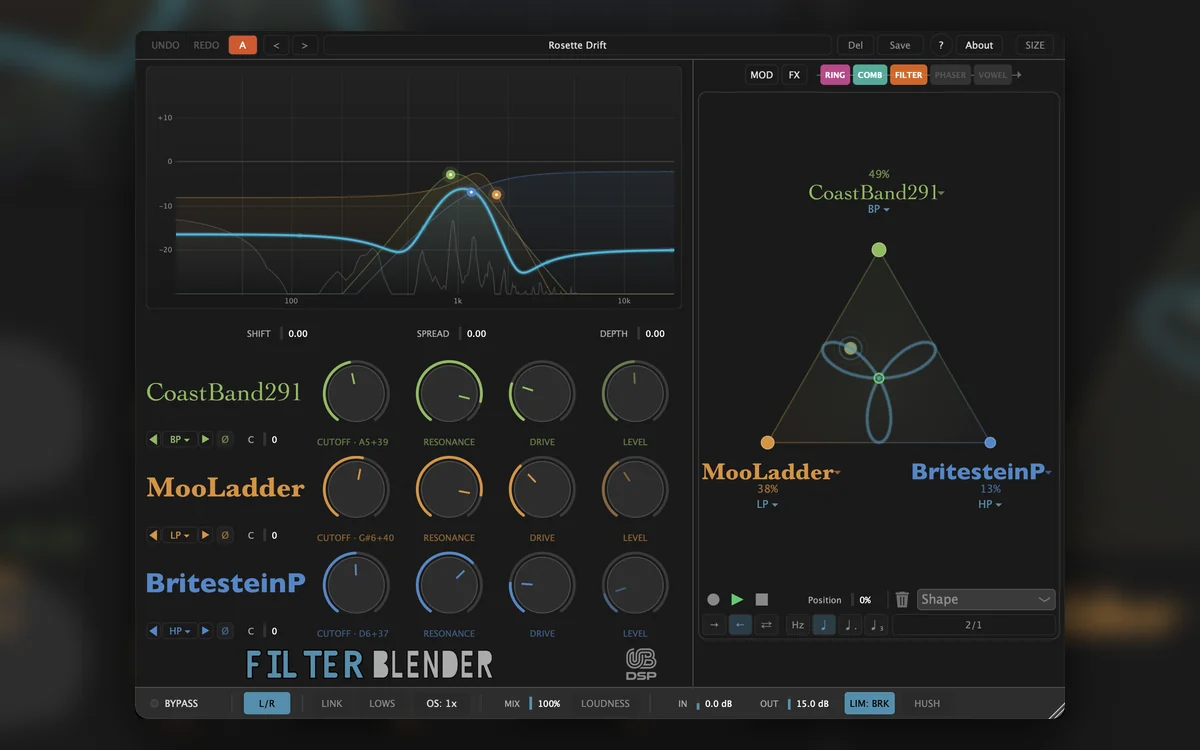
Filter Blender is a filter plugin that puts three analog-style filters on the corners of a triangle and blends them with a single dot. You drag the dot and the character of the filter changes while the part plays, from a warm transistor ladder to a screaming 2-pole to a lo-fi CMOS band.
In numbers:
- 12 modelled filter circuits, any three on the corners, each with its own cutoff, resonance and drive.
- 1 dot that weighs the three by distance. Park it on a corner and you have a single filter. The other two are not even computed.
- 1 motion recorder that loops a path drawn on the triangle, in time with the song.
- 3 more filters in the effects chain (comb, phaser, vowel) plus a ring modulator, before or after the triangle, in any order.
- 9 modulator types, up to 16 at once.
- AU, VST3, CLAP and AAX on macOS. VST3, CLAP and AAX on Windows. VST3 and CLAP on Linux.
If you'd rather listen before you read on, the product page has audio examples, dry against processed.
Why blend three filters instead of sweeping one
A filter sweep changes how bright a sound is. Changing the filter changes its character.
Set any two filters gently and they sound much the same: the top goes, the bottom stays. Push the resonance and the drive, and they stop agreeing. A ladder rounds off where a diode filter starts to bite, and a diode-driven 2-pole screams where a clean state-variable stays smooth.
A filter's character is in how it breaks, not where it cuts.
Each corner of the triangle keeps its own settings, so moving the dot changes the slope, the resonance and the saturation together. It is three filters playing at once, not a volume crossfade.
The slope is a good way to hear it. Each model has its own slope, 12, 18 or 24 dB per octave, and there is no slope knob. You change how steep the filter is by moving between models. The Init preset is set up for exactly that: a 4-pole ladder, a 2-pole state-variable and a diode ladder at about 18 dB per octave, one on each corner. Link the three cutoffs, pull them down on a pad and drag the dot.
Slope also decides how far a fast filter envelope pulls a low note out of tune: about twice as far on the 4-pole corner as on the 2-pole one, for the same envelope. I measured it, and wrote up why it happens and how to fix it, in why a fast filter envelope pulls your note out of tune.
The same cutoff goes from dark and round to open and airy, and all you moved was your hand.
Twelve circuits, each with its own character
Filter Blender ships twelve filter models. Any three of them can sit on the corners at once.
| Model | Character | Modes | Good for |
|---|---|---|---|
| MooLadder | Warm 4-pole transistor ladder, round and musical resonance | LP, HP, BP | Bass, pads, the classic sweep |
| Acid303 | Diode ladder, about 18 dB per octave near the cutoff, squelchy. The corner moves with how hard you play | LP, BP | Acid lines, drums with attitude |
| OberSilk | 2-pole state-variable, smooth and clean, with a gentle slope | LP, HP, BP, Notch | Keys, vocals, subtle sweeps, notches |
| ScreamKor20 | 2-pole filter with diodes inside its resonance loop, and diode grit after it as DRIVE rises. With DRIVE up, it screams at the top of RESONANCE | LP, HP, BP | Aggressive leads, screaming sweeps |
| BritesteinP | 2-pole multimode with an edgy resonance and a soft limiter in the loop. Turn up DRIVE and it starts to sing | LP, HP, BP | Bright leads, hats, edgy highs |
| LushJup8 | Creamy 4-pole cascade, smooth and polished | LP, HP, BP | Pads, polysynth sheen |
| CrunchWasp | Lo-fi CMOS-style filter: it clips hard, with a touch of digital grit on top | LP, HP, BP | Drums, lo-fi textures |
| CoastBand291 | Two band-passes in series, West Coast style. In BP, with resonance and drive up, they ring on every hit | LP, HP, BP | Pings on drums and plucks, broad bands |
| WildDiode3 | 3-pole filter, 18 dB per octave, with diode saturation in its feedback. Distorts hard when pushed and sings about nine semitones above CUTOFF | LP, HP, BP | Noise, aggressive bass, sound design |
| FunkyFollowIII | State-variable with its own envelope follower: the cutoff rises with the loudness of what you play. Play harder, or raise IN or DRIVE, for a wider sweep | LP, HP, BP | Funk guitar, clav, auto-wah |
| CryWah | Swept, vocal band-pass, like a wah pedal | BP | Guitar, vowel-like sweeps |
| MorphPoleX | Pole-mixing multimode: the most shapes of any model, and the only Bell | LP, HP, BP, Notch, Bell | EQ-like lifts, gentle dips, exotic shapes |
Some of them are polite. WildDiode3 is not.
Eight of the twelve self-oscillate: MooLadder, Acid303, ScreamKor20, BritesteinP, LushJup8, CrunchWasp, WildDiode3 and MorphPoleX. All of them need some DRIVE to get there. With drive, they start to sing somewhere between about 84 and 99 % of RESONANCE, depending on the model (measured at 1 kHz).
Only three of them sing on the note shown under CUTOFF: MooLadder, LushJup8 and MorphPoleX. The others sing off the note, by an amount that depends on the model and the cutoff. I could have pulled them back onto the note, and I chose not to: tune those by ear.
How they are built
Every model is built on a zero-delay-feedback core, which keeps the filters stable when you sweep or modulate them fast. The three 4-pole ladders saturate inside their feedback loop when you push them, and their DRIVE also feeds the resonance, so DRIVE changes how the resonance behaves, not only how loud it gets.
When a corner you can hear sits above 8 kHz, the filters switch to 2x oversampling on their own, with the same latency either way. The full details are in the Filter Blender manual.
The filter I rebuilt before release
The manual said CoastBand291 pinged on every hit. When I listened to it again before release, it didn't. Each hit died out in a few milliseconds, which is a nice tight band-pass and not at all what the text promised.
So I went back into it until a hit rang on one note, with RESONANCE and DRIVE up, and kept the version that sounded right to my ears. It still never self-oscillates. It just rings, the way a struck object rings, and then lets go.
Draw it once, it keeps moving
The motion recorder loops any path you draw on the triangle, in time with the song. The blend keeps moving on its own while you get on with the rest of the track.
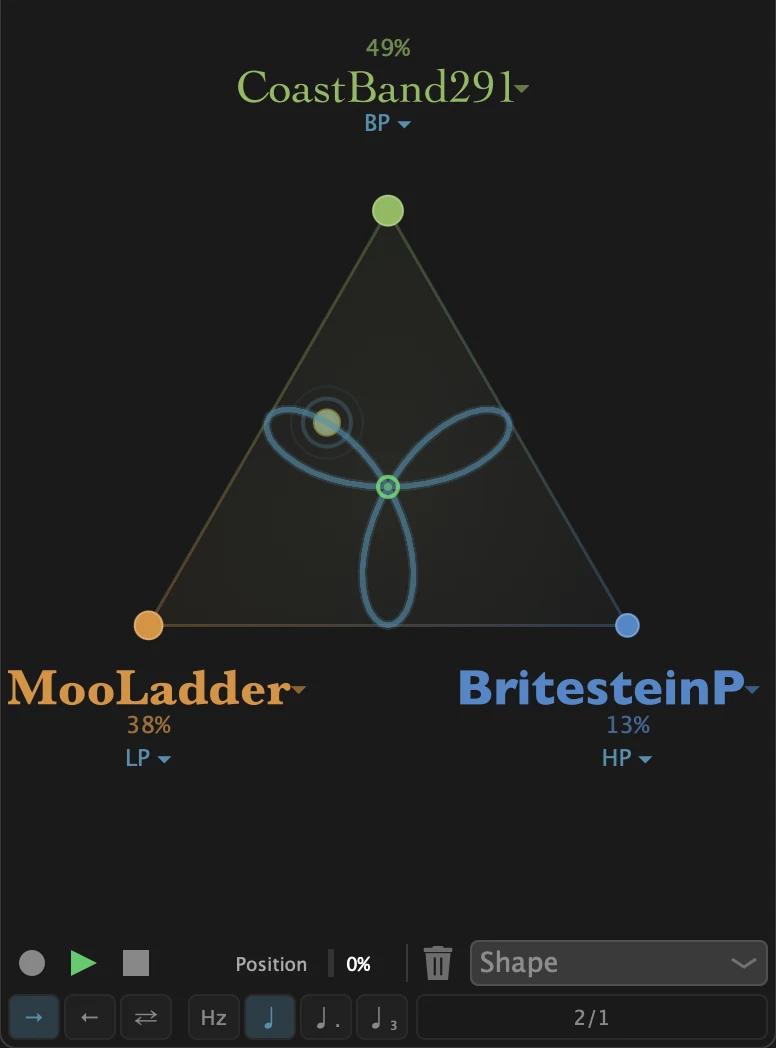
The dot is also two automatable parameters, Blend X and Blend Y, if you'd rather draw the move in your DAW.
Let your playing move the blend
Filter Blender has nine modulator types, up to 16 at once, and they can modulate each other: LFO, MSEG, step sequencer, audio-rate oscillator, envelope generator, envelope follower, macro, MIDI and XY pad. Route one to the level of a corner and the dot moves on its own. Put an envelope follower there and the filter changes character when you play harder.
The envelope generator triggers from the audio or from MIDI notes. The followers listen to the audio coming into the plugin. There is no external sidechain input.
Three more filters in the chain, plus a ring mod
Four effects sit around the triangle, before or after it, in any order:
- Comb Delay, a comb filter: a short delay line fed back on itself, with a low-pass in the loop.
- Phaser, a cascade of 2 to 24 first-order all-pass stages.
- Vowel, four formant band-passes in parallel, ten vowels. It is not the Vowel Blender engine: no voice models and no 2D pad.
- Ring Mod, which is not a filter at all. It multiplies the signal by a carrier. Put it after the triangle when a part is too polite.
The details that keep it musical
- The bass stays put. LOWS sends everything below a split you choose, from 20 to 500 Hz, around the filters and the effects. The kick and the bass stay as they were, so you can push the resonance without fear.
- No comb filtering at partial mix. MIX, LOWS and M/S stay in phase with the processed signal.
- Stereo your way. In M/S, the filters work on the centre and the sides pass untouched.
- Judge the tone, not the volume. LOUDNESS holds the output close to your input level, so a closing filter does not sound worse just because it is quieter.
- Resonance without the spikes. A limiter sits right after the filters. BRK holds the peaks around -0.2 dBFS, SFT compresses gently above -2 dBFS.
- Fixed latency. 47 samples, about 1 ms at 48 kHz, compensated by your host.
How Filter Blender compares
Filter Blender is not the only way to put more than one filter on a sound. Here is where it fits.
| Approach | What you get | When it's the right tool |
|---|---|---|
| The filter in your synth or DAW | One character at a time. A sweep changes brightness | When one character is all the part needs |
| A multi-filter plugin | Several filters on one sound, routed in series or parallel | When you want to build a routing |
| Filter Blender | Twelve filters inspired by classic circuits, three at a time, weighed by one dot. The character changes while you play, and the motion recorder loops the move | When the move between characters is the sound you're after |
And if one good filter is all you want, park the dot on a corner. Filter Blender is then a single filter, any of the twelve, and it costs one filter's worth of CPU.
Formats, platforms and licensing
- macOS: AU, VST3, CLAP, AAX. Windows: VST3, CLAP, AAX. Linux: VST3, CLAP. No standalone version.
- Tested in Ableton Live, Bitwig Studio, Logic Pro, Pro Tools and REAPER.
- No iLok, no activation server. You buy once, load a keyfile, and the check happens on your computer. Your licence covers up to three computers you own and use.
- The trial is the full plugin with 2 seconds of silence every 40 seconds, with no time limit.
- Updates are free for life. Telemetry is off unless you turn it on.
Frequently asked questions
What is Filter Blender?
Filter Blender is an audio filter plugin by UB DSP. It places three of its twelve modelled analog-style filters on the corners of a triangle and blends them continuously with one dot, so the filter's character can change while a part plays.
Can I run the three filters in series?
No. The three corners process the same signal in parallel, and the dot sets how much of each you hear. The effects chain (comb, phaser, vowel, ring mod) runs in series around the triangle, and you can reorder it.
Which Filter Blender filters self-oscillate?
Eight: MooLadder, Acid303, ScreamKor20, BritesteinP, LushJup8, CrunchWasp, WildDiode3 and MorphPoleX. They need some DRIVE to start. Only MooLadder, LushJup8 and MorphPoleX sing on the note shown under CUTOFF.
Is the Vowel effect the same as Vowel Blender?
No. The Vowel stage in Filter Blender is four formant band-passes with ten vowels. Vowel Blender is a separate plugin, with its own 2D vowel pad, voice models and motion system.
What plugin formats does Filter Blender support?
AU, VST3, CLAP and AAX on macOS. VST3, CLAP and AAX on Windows. VST3 and CLAP on Linux. There is no standalone version.
Does Filter Blender need iLok or an internet connection?
No. The licence is a keyfile checked offline on your computer, valid on up to three computers you own.
How much latency does Filter Blender add?
47 samples, about 1 ms at 48 kHz, compensated by the host. The limiter's look-ahead adds 1.5 ms when it is on.
Availability and pricing
Filter Blender is $39 until Sunday, November 15, 2026, 23:59 CET, then $68. If you already own Grit Blender or Vowel Blender, your owner's discount applies to the launch price too. Log in and it shows on the product page.
Every purchase has a 30-day money-back guarantee, no questions asked.
I build these plugins on my own, in France. Grit Blender and Vowel Blender were both reviewed by Sound On Sound, and when you write to support, I'm the one who answers. If you put Filter Blender on something you like, I'd love to hear it.
Joy to use, joy to hear. That was the whole brief, and the best way to judge it is on one of your own loops: try Filter Blender free.
Sources
- UB DSP, Filter Blender user manual, for the twelve models, their modes and the signal chain.
- Vadim Zavalishin, The Art of VA Filter Design, Native Instruments, the reference text on zero-delay-feedback filter design.
Ben, UB DSP